Week Four – Model-View-Controller Pattern & Unity

Diagram of interactions within the MVC pattern.

Retrieved from https://en.wikipedia.org/wiki/Model–view–controller on 18 August 2019.

On Monday we looked at the architecture of the Model-View-Controller and how its use depends on the target platform. We are using Unity for this project which does influence the pattern more than other targets in this case. Unity already has chunks of code that represent this pattern. It accepts input, displays and gives output dependent on input and allows navigation.

We can however manipulate how Unity behaves using our own scripts. E.g. we need a controller of some sort that switches screens and we need a representation of other players within the game at that time which allows synchronous play.

Using the MVC pattern we need to think about which scripts and classes belong to which part of the pattern. Which scripts involve the modellers, the controllers and the views? We are basically dividing our scripts into a pattern to help modularise code so it is reusable and can be worked upon by a number of developers at once.

Unity is a platform aligned with OO development and by thinking of our development in an abstract way, using the MVC pattern, we can look at our use cases defined in the OO analysis to create a class diagram that has an overlay of that abstract pattern. By dividing classes into specific areas within that model allows the separation of concerns so we can write simpler code that is easier for us to write to develop the app and for others to use again to program or to work with me on the same app.

Unity has its own built in hierarchy for the views which can be seen as the scenes in Unity. We build components and for them to know to execute the scripts we have made we have have a form of controller associated with little ‘hooks’ which are bridges to the controller that tells it which code to execute.
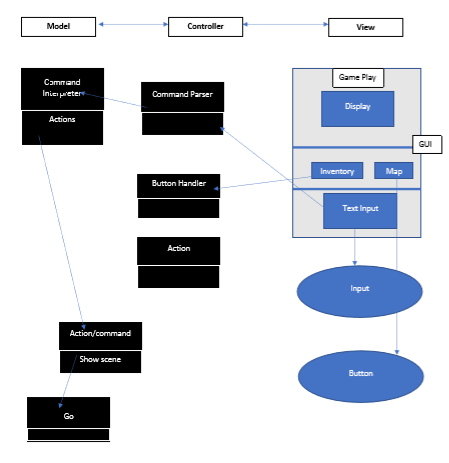
Class Example of MVC with Game

When input is entered in the text input a simple code looks for hooks to use e.g. event handlers.

If a button is clicked there is a generic button script that executes a list of actions. e.g. open inventory

The information that is being worked with is changed as we move from screen to screen – which can be seen as the view.

The list of actions is a domain model representation for the screen – i.e.what is needed for each screen. The game play, inventory and map is mapped to Unity for each situation or “scene”.

The data from the model can be pulled into a view – maybe different inventory items can only do something in a certain scene – so we need to know what is in each scene.

The Game Manager model does this – Inventory model for that situation so need to have set up what sort of information we need for inventory display e.g. each situation has different data requirements to be pulled in.

The state of the game between situations needs to be maintained so a chunk of the view comes with a model behind it. The characteristics of it – is maintained – the user needs to know where they are at in the game from scene to scene. There are two ways into actions and commands. Classes and inheritance can be used to standardise what happens e.g. a class for all actions can have sub-classes that inherit the top classes standardised methods, can override certain methods to specialise an action.

The model holds the ‘state’ information for the game:

  • who is playing
  • what the score is
  • what the players inventory holds
  • where on the map they are
  • where is the wolf?

A problem with Unity is that it ‘forgets’ its state information from one scene to another. One mechanism to get it to hold the state in memory across scenes is using a singleton solution (making static global instances) as a pattern.

To get a model applied across all scenes you can also use parallel programming, so all scripts run at the same time, but you have to give them an order of precedence. This means you can remove information out of one situation to bring to another situation. In C# a singleton is a single instance of a thing that you can refer to but the following code is a better option:

ClsGameManager }

static GameManager instance;

start()

{ void awake() {

if (instance = null)

instance = this;

}

}

aGame.instance.inventory

aGameInstance.PlayerID

Solution

Class Static GameManager {

public static InventoryList inventory;

public static PlayerID playerId

public static GameScene scene;

}

So these exist once everywhere. It is a tidier and better solution than singletons and exists across all scenes.

On Thursday we practiced using the test code to add another scene on a command from text input and tried to create an inventory when an item was picked up. It’s can be confusing but trying it out and looking at how each script works together by examining the overall pattern and classes which helps to get a better picture of the modules of code that do different jobs yet work together!
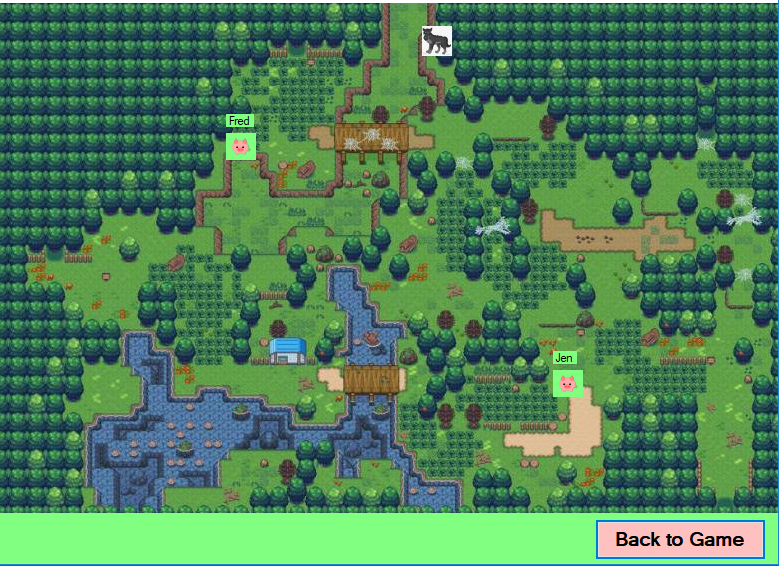
Game Map

Learning Unity

Bouncy Balls

It has been a massive learning curve over the last weeks. Git was something that took quite a while to get right and is a component of this course too. Usually the massive spikes of work come near the end of the courses yet this semester it has been in the early stages.

There were a number of tutorials to get through that combined were approximately 32 hours. Yet, I could see how important it is to get the foundations for a new platform or language so I just went for getting them done. This did mean some other things such as my blogs were not up-to-date which is not something I wanted either. So I need to reflect on putting a schedule in place to meet all deadlines for all courses.

I felt completing the tutorials was the highest priority so I know going forward what I am working with. I have said previously I am not a gamer and I also don’t have an Android device. I am aware that much of the development happening is in this area and this course is focusing on a project in this area, so I need to learn what Androids really are and their functionality.

” An Android device is a device that runs on the Android operating system. Android is an array of software intended for mobile devices that features an operating system, core applications and middleware. Android is developed by the Open Handset Alliance, which is led by Google. ” Retrieved from https://www.techopedia.com/definition/25101/android-device .

This is where the Model-View-Controller (MVW) pattern will help me understand what happens on Android devices when running an application as well as developing an app.

MVW can be seen as – Models (Data CRUD), Views (Interface/Detection) and Controllers (Decision/Action). This means I can see how a complex system works together as well as have an overall model to follow when developing an app. I am working with the Unity platform and this model can be applied to my initial design for the development of my text-based game.

I am reading up about how the model applies to Unity and in what ways I can use it in my development. I have completed most of the bunny run tutorials and have a repository on Github for it. I also created a repository for my project. The links are https://github.com/DiODonnell/BunnyRunTut and https://github.com/DiODonnell/SDV602Project

I am working on my OO analysis for the game and have created storyboards and am now adjusting some as when I connected all the screens I saw some omissions. I will continue working on the analysis and am using the Case Study provided in our course materials as a guide. http://www.math-cs.gordon.edu/local/courses/cs211/ATMExample/

I will continue with the bunny tutorial and hope my son will let me use his android device for testing! I have links to the Unity tutorials and documentation saved to my browser as references.

It was great to have the opportunity to see some examples of Unity apps from the tutors from China last Thursday. As an educational tool they have such potential and I particularly loved the devices they had built for young children!

Week 1 – 25 July 2019

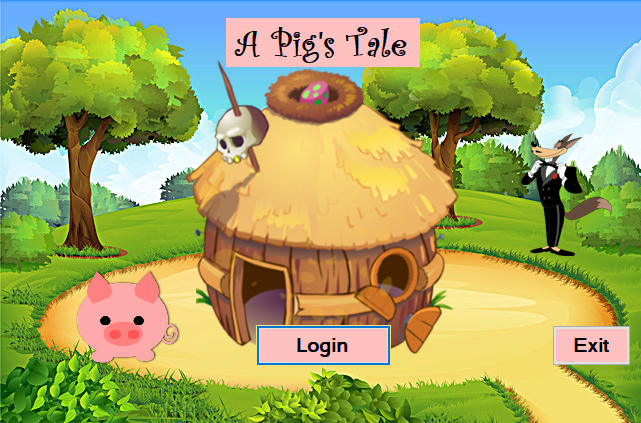
Project Proposal – A Pig’s Tale

After researching and looking at some text based games I decided to use Unity and create a game for young children. I like basing things on something well known and giving it a twist – mainly to save time but also something that is familiar for my target audience. The “Three Little Pigs” seemed like a good option – multi collaborative effort with the little pigs so suitable for multi player criteria , a villain “the wolf” – this time a jewel thief and a challenge – building a brick house. I also have obstacles that can affect health if an item in the player’s inventory isn’t there.

Not knowing Unity when creating my brief for the project means it may change when I find what I can and can’t do in the platform. We had a go at some tutorials in the last class and it is quite exciting what you can make within Unity using the tools and assets available. A ‘material’ can be added to an object that will give the object physical attributes – such as gravity – so it will fall. I tried some code in visual basic but found I needed to add the Unity language etc to my Visual Basic application so had to modify a reinstall to add that feature under game and development. I am looking forward to seeing what I can create for my game in Unity and am now going onto to complete the tutorials to make a 2-D bunny game which will give me a far better understanding of what I can do with my game.

I have created some storyboard screenshots which help me “see” what will be happening for the user and where I might need to amend the proposal to fit in with Unity. I have used free assets to draw the scene but hope to create my own assets in Unity. I really enjoy the creative aspect of this project and am sure I will learn many new skills during this course.

SDV602 – Project Brief

Photo by Daniel Korpai on Unsplash

Programming Languages

First day in class and we have gone through what we will be doing for this course. It is project based learning which I prefer as hands on is how I learn optimally – that I retain and build on my knowledge. We will have three milestones to complete for the project as well as this reflective journal. This is an iterative approach to designing and building which is often used in development of software. This allows building something in stages, testing its development at each stage and getting feedback on what is going right and what needs to be changed to meet the overall requirements.

We will be looking at using another programming language that is new to us and getting to understand what the history of its development and the philosophy behind it as well as looking at its strengths and weaknesses. We will use OO as the development method and UML diagrams to guide us in the actual build. Learning the syntax of the language will be a large part of this project as learning how to write the code so it executes the desired outcomes will be key.

We are to build an application to be used on a mobile platform – it can be a multi-player game using a platform such as Unity or we can propose building something else and an alternative language; if we put our proposal forward to our tutor and get approval for our justification and reasoning for our proposal.

I’m not a gamer and have very little experience in using those types of applications. I would prefer to build something that is business orientated for use on a mobile but am unsure which language I would use for that without further research.

A game does sound like fun and I would be learning new skills so will take the time to think about what I could build.

Programming languages are statements that we write – called the source code – which is a way that humans can write instructions that is converted into machine code for the computer to carry out certain actions. Each language has its own particular syntax – what we write and in what order. Languages can be executed in different ways so that the language is converted to machine code. Programming languages are written in plain text but symbols and words can have different meanings across languages. Learning the way to write and the “grammar” to use is part of learning any new language. Understanding how the language is converted into machine code is also important in understanding a language.

Choosing the language I will learn will be exciting and at this stage I’m wondering about Python so will carry out some research on what I can build with it and what the syntax is like.