
Retrieved from https://en.wikipedia.org/wiki/Model–view–controller on 18 August 2019.
On Monday we looked at the architecture of the Model-View-Controller and how its use depends on the target platform. We are using Unity for this project which does influence the pattern more than other targets in this case. Unity already has chunks of code that represent this pattern. It accepts input, displays and gives output dependent on input and allows navigation.
We can however manipulate how Unity behaves using our own scripts. E.g. we need a controller of some sort that switches screens and we need a representation of other players within the game at that time which allows synchronous play.
Using the MVC pattern we need to think about which scripts and classes belong to which part of the pattern. Which scripts involve the modellers, the controllers and the views? We are basically dividing our scripts into a pattern to help modularise code so it is reusable and can be worked upon by a number of developers at once.
Unity is a platform aligned with OO development and by thinking of our development in an abstract way, using the MVC pattern, we can look at our use cases defined in the OO analysis to create a class diagram that has an overlay of that abstract pattern. By dividing classes into specific areas within that model allows the separation of concerns so we can write simpler code that is easier for us to write to develop the app and for others to use again to program or to work with me on the same app.
Unity has its own built in hierarchy for the views which can be seen as the scenes in Unity. We build components and for them to know to execute the scripts we have made we have have a form of controller associated with little ‘hooks’ which are bridges to the controller that tells it which code to execute.
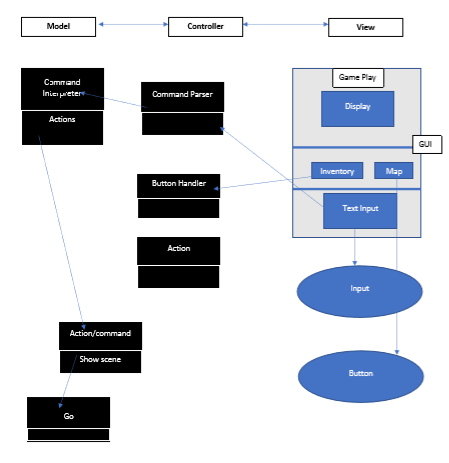
When input is entered in the text input a simple code looks for hooks to use e.g. event handlers.
If a button is clicked there is a generic button script that executes a list of actions. e.g. open inventory
The information that is being worked with is changed as we move from screen to screen – which can be seen as the view.
The list of actions is a domain model representation for the screen – i.e.what is needed for each screen. The game play, inventory and map is mapped to Unity for each situation or “scene”.
The data from the model can be pulled into a view – maybe different inventory items can only do something in a certain scene – so we need to know what is in each scene.
The Game Manager model does this – Inventory model for that situation so need to have set up what sort of information we need for inventory display e.g. each situation has different data requirements to be pulled in.
The state of the game between situations needs to be maintained so a chunk of the view comes with a model behind it. The characteristics of it – is maintained – the user needs to know where they are at in the game from scene to scene. There are two ways into actions and commands. Classes and inheritance can be used to standardise what happens e.g. a class for all actions can have sub-classes that inherit the top classes standardised methods, can override certain methods to specialise an action.
The model holds the ‘state’ information for the game:
- who is playing
- what the score is
- what the players inventory holds
- where on the map they are
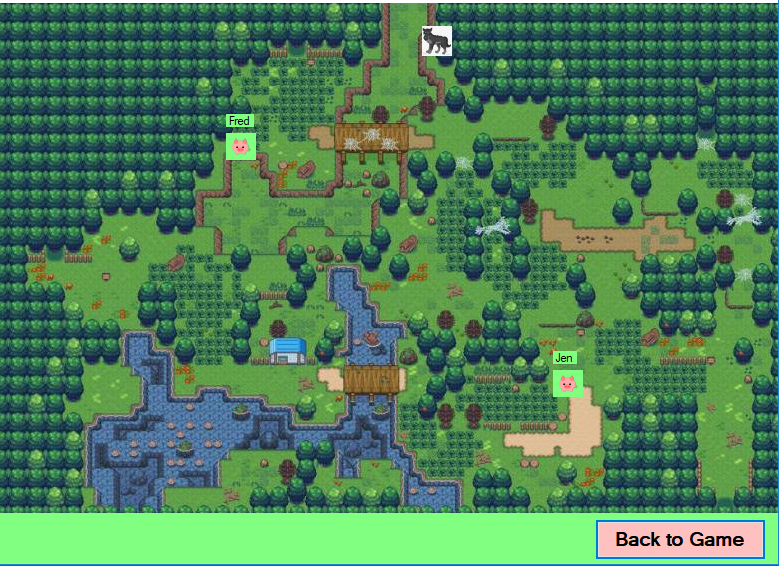
- where is the wolf?
A problem with Unity is that it ‘forgets’ its state information from one scene to another. One mechanism to get it to hold the state in memory across scenes is using a singleton solution (making static global instances) as a pattern.
To get a model applied across all scenes you can also use parallel programming, so all scripts run at the same time, but you have to give them an order of precedence. This means you can remove information out of one situation to bring to another situation. In C# a singleton is a single instance of a thing that you can refer to but the following code is a better option:
ClsGameManager }
static GameManager instance;
start()
{ void awake() {
if (instance = null)
instance = this;
}
}
aGame.instance.inventory
aGameInstance.PlayerID
Solution
Class Static GameManager {
public static InventoryList inventory;
public static PlayerID playerId
public static GameScene scene;
}
So these exist once everywhere. It is a tidier and better solution than singletons and exists across all scenes.
On Thursday we practiced using the test code to add another scene on a command from text input and tried to create an inventory when an item was picked up. It’s can be confusing but trying it out and looking at how each script works together by examining the overall pattern and classes which helps to get a better picture of the modules of code that do different jobs yet work together!
 Di's SDV602 Journal